Email testing for agencies.
The fake SMTP sandbox that catches emails from any staging environment. And organizes them for all of your clients and projects.
Happily used by teams worldwide





# How it works
Point your SMTP here
Four lines in .env. Works with anything that speaks SMTP: Laravel, Rails, Django, Node, or a raw socket.
MAIL_HOST=smtp.mailsandbox.com
MAIL_PORT=2525
MAIL_USER=msb_a8f21c
MAIL_PASS=••••••••••
We catch every email
Password resets, receipts, digests: every message your app tries to send is captured the instant it leaves, with the full HTML intact. Nothing reaches a real recipient.
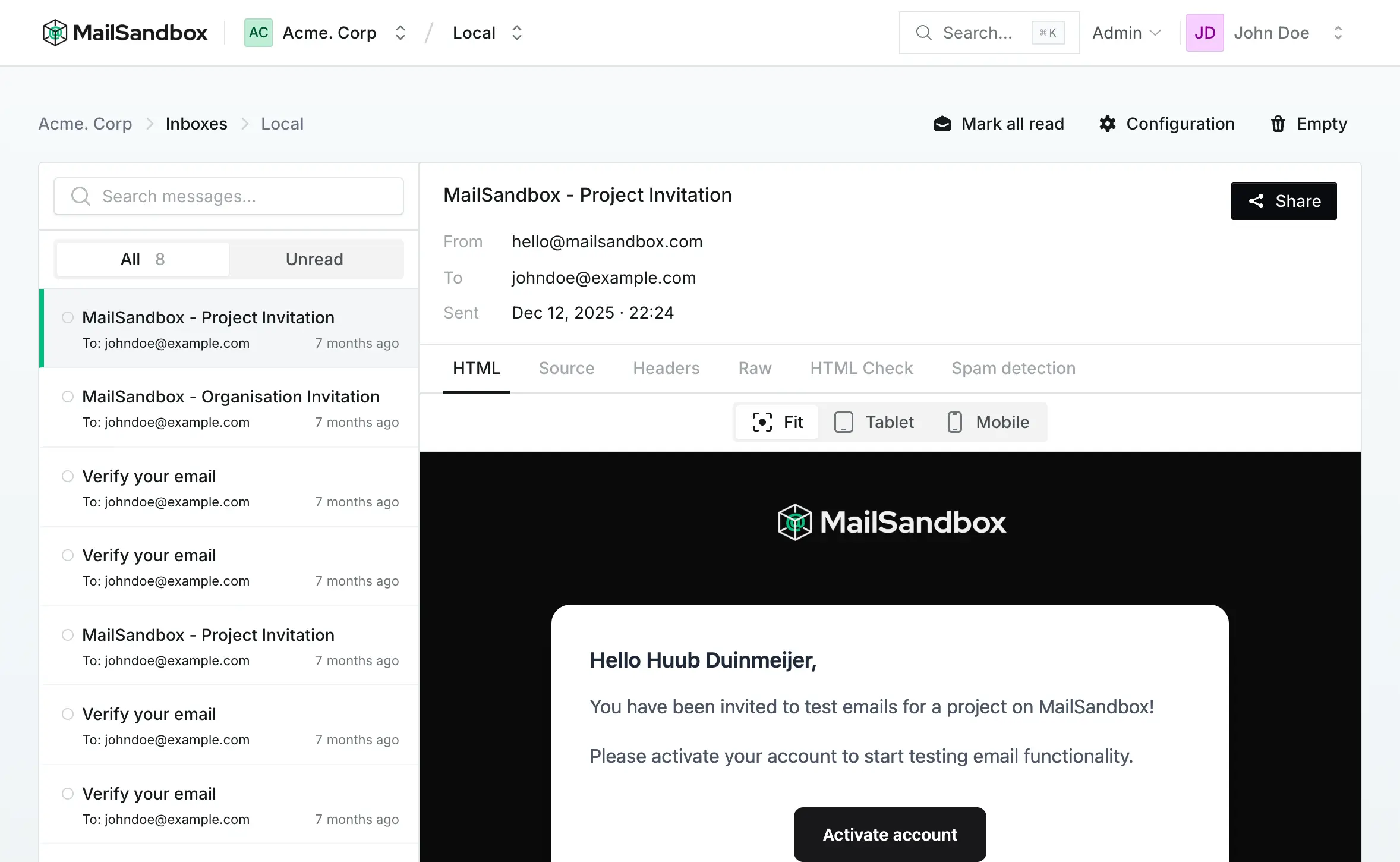
Review, sorted by client + project
Every inbox belongs to a project, every project to a client, the structure your agency already thinks in. Open a message to review the full HTML, then share a link so clients can check it without an account.
# Walkthrough
# Features
Everything you need to catch, review, and share the emails your app sends, and nothing you don't.
A real fake SMTP
Catches every message on a standard SMTP endpoint and stops it there. Nothing is ever relayed to a real recipient.
Full HTML preview
Preview responsive layouts and flag email-client compatibility issues, with the raw source one click away.
MCP for Cursor & Claude
Send and read test emails straight from your AI coding agent. Connect your inbox over MCP and it handles the sending, reading and spam checks for you.
Client + project structure
Unlimited inboxes grouped by project, projects by client, with your plan scaling by active project rather than by seat. The structure your agency already thinks in.
Shareable review links
Send a signed link. Reviewers open it without an account, and you can revoke it anytime.
Spam score analysis
Every captured email is scored, so you catch deliverability issues before your client ever does.
# Pricing
Free
Personal testing, no card needed
- Emails / mo
- 100
- Inboxes
- 3
- Projects
- 1
- Team members
- 1
- SMTP capture & spam-score preview
- Browser-based email inspector
- 14-day sharing trial on your first email
- No credit card required
Starter
For client projects
- Emails / mo
- 2,500
- Inboxes
- Unlimited
- Projects
- 5
- Team members
- Unlimited
- 25× more emails than Free
- Automated email inspection
- Shareable client review links
Growth
For agency collaboration
- Emails / mo
- 15,000
- Inboxes
- Unlimited
- Projects
- 15
- Team members
- Unlimited
- 6× more emails than Starter
- Private developer inboxes for every teammate
- 12 MB max email size & faster send rate
Business
For high-volume testing
- Emails / mo
- 75,000
- Inboxes
- Unlimited
- Projects
- 50
- Team members
- Unlimited
- 5× more emails than Growth (75,000/mo)
- 50 active projects & 16 MB max email size
- 200 emails per 30 seconds for load testing
Prices are in USD and billed per organisation — one price covers your whole team, no per-seat fees. Going over your monthly email volume doesn't interrupt capture; upgrade anytime to raise it.
# FAQ
Still unsure about something? Read the docs or just start free. The answer is usually "yes, and it took four lines."
Correct. MailSandbox accepts mail on a standard SMTP endpoint and stops it there. Every message is captured, rendered, and stored for review. None of it is ever relayed to the real recipient. Point staging at it and you can send a thousand password resets without a single one landing in an actual inbox.
Captured emails are retained per your plan and can be deleted anytime, manually or on an automatic schedule. Share links are signed with a rotating secret, expire on a window you set, and are revocable in one click. Reviewers only ever reach the single email you shared, never your dashboard or another client.
If it speaks SMTP, it works: Laravel, Rails, Django, Node/Nodemailer, or a raw socket. There is no SDK to install and nothing proprietary to adopt: you change the host, port, and credentials and you are done. Switching back is exactly as easy, so there is no lock-in.
It scales with your plan: the Free plan includes 1 active project and 3 inboxes; paid plans go from 5 active projects on Starter up to 50 on Business, with unlimited inboxes on every paid plan. There is no separate per-client fee, so most agencies just add a project per client and grow into the tier that fits. See the pricing table above for the exact limits on each plan.
Active simply means not archived. Archiving a finished project stops it from capturing new email and immediately drops it off your project count, so you are never paying to keep a wrapped-up client around. Archived projects, and everything inside them, stay fully restorable whenever you need them again.
Anytime. Revoke a single link, regenerate it with a fresh signature, or let it expire on schedule. You also see how many times a link has been opened and when it was last viewed, so you know a review actually happened.
Depends which kind. An anonymous share link needs no account at all: a reviewer clicks it and sees the captured email rendered cleanly in their browser, with none of the MailSandbox interface around it. If you would rather invite a client as a standing collaborator, add them as a client reviewer instead: they log in, but only ever see the specific projects you assign them, with no access to billing, settings, or deletion. Client reviewers are unlimited on every paid plan.
A tester is a lightweight, send-only credential: useful for a developer or QA contractor who needs to push test emails into a project, but not to browse what has been captured. A client reviewer is the opposite: they can open a project and review the emails inside it, but cannot send anything or touch billing, settings, or other projects. Use whichever matches what that person actually needs to do.