

HTML & CSS compatibility check
Overview
Section titled “Overview”Email clients are notoriously inconsistent — a layout that looks perfect in Apple Mail can fall apart in Outlook. The HTML Check tab analyses the HTML and CSS your email uses and tells you which features are supported across the major email clients, so you can fix problems before you send.
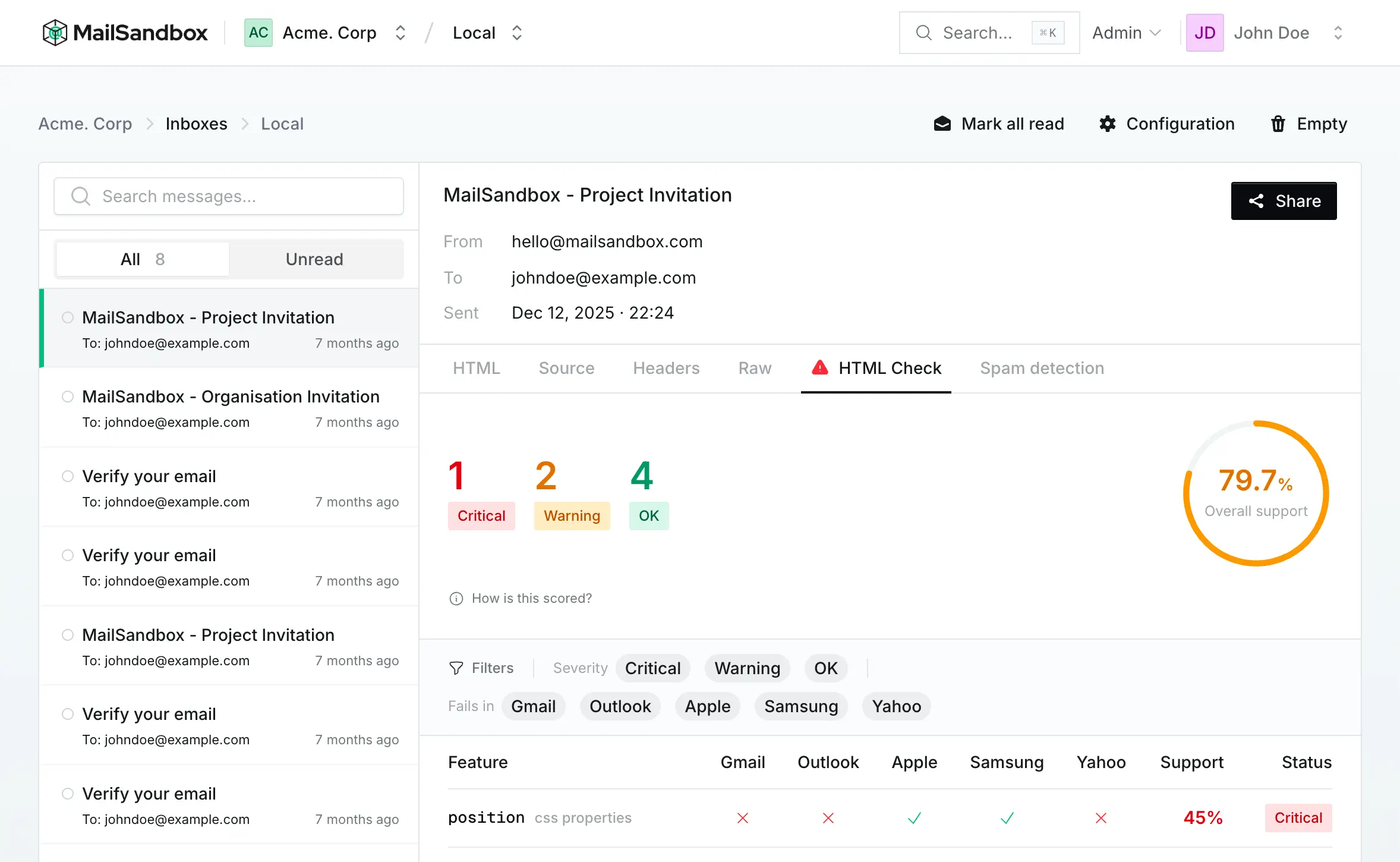
The support score
Section titled “The support score”At the top you get an overall support percentage and a count of issues grouped by severity:
- Critical — features that are broadly unsupported and likely to break the layout
- Warning — features with partial or inconsistent support
- OK — features that are well supported across clients
The score is computed from how well the features your email actually uses are supported, weighted across clients — so it reflects your specific message, not a generic checklist.
Feature breakdown
Section titled “Feature breakdown”Below the score, a table breaks the result down feature by feature — CSS properties, HTML elements, media queries and web fonts — showing whether each is supported in:
- Gmail
- Outlook
- Apple Mail
- Samsung Mail
- Yahoo Mail
You can filter by severity or by the client a feature fails in, so it is easy to answer a question like “what breaks in Outlook?” at a glance and fix exactly those issues.